2016/9/22

Outlook 通知腳本 PushBullet Ver 1.0


使用PushBullet 寄發 outlook 信件通知
有時候公司信 外部不能收 , 亦或是作業環境關係不能時常檢查信件,

當收到新信件時,透過PushBullet 只將標題和寄件者提醒至手機上
更換 YOUR_ACCESS_TOKEN 

取得方式請到 https://www.pushbullet.com/ > setting 取得API TOKEN
可以指定哪一個device 要接受此通知,帶入ID即可

' PushBullet  MARCO 腳本 Ver 1.0 by henry
PushBullet  YOUR_ACCESS_TOKEN
Private Sub Application_NewMailEx(ByVal EntryIDCollection As String)
    Dim objItem
    Set objItem = Session.GetItemFromID(EntryIDCollection)
    If objItem.MessageClass = "IPM.Note" Then
        AutoForward objItem
    End If
End Sub
Private Sub AutoForward(ByVal objMail As MailItem)
    '
    Dim strFileName As String
    Dim fwMail As MailItem
'   Dim i As Integer
    Dim strSenderName As String
    Dim strSenderEmailAddress As String
    Dim strSubject As String
    Dim strbody As String
'
    On Error GoTo ErrorTrap
    '
    ' 標題、送信者、本文取得
    strSubject = objMail.Subject    ' 標題取得
    strSenderName = objMail.SenderName  ' 送信者取得
    strSenderEmailAddress = objMail.SenderEmailAddress  ' Email取得
    strbody = objMail.Body ' 本文取得
strbody = mid(strbody,0,100)
    '
    If strSenderName = strSenderEmailAddress Then
        strSenderName = strSenderEmailAddress
    Else
        If InStr(strSenderEmailAddress, "@") Then
            strSenderName = strSenderName + "<" + strSenderEmailAddress + ">"
        Else
            strSenderEmailAddress = _
            objMail.Sender.PropertyAccessor.GetProperty("http://schemas." _
            & "microsoft.com/mapi/proptag/0x39FE001E")
            strSenderName = strSenderName + "<" + strSenderEmailAddress + ">"
        End If
    End If
    '
TargetURL = "https://api.pushbullet.com/v2/pushes"
  Set HTTPReq = CreateObject("WinHttp.WinHttpRequest.5.1")
  HTTPReq.Option(4) = 13056 '
  HTTPReq.Open "POST", TargetURL, False
  HTTPReq.SetCredentials "user", "password", 0
  HTTPReq.setRequestHeader "Authorization", "Bearer YOUR_ACCESS_TOKEN"
  HTTPReq.setRequestHeader "Content-Type", "application/json"
  Message = "{""type"": ""note"", ""title"": " & _
      vbDoubleQuote & strSubject & vbDoubleQuote & ", ""body"": " & _
      vbDoubleQuote & strbody & vbDoubleQuote & "}"
  HTTPReq.Send (Message)
  ' delete this line once you are happy it works. Or put in some proper error handling!
  MsgBox (HTTPReq.responseText)
'
ErrorTrap:
'
End Sub

2016/5/4

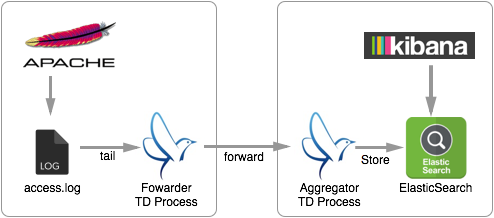
elasticsearch + fluentd + kibana4(EFK)


elasticsearch 安裝

tar xfvz elasticsearch-2.3.2.tar.gz
mv elasticsearch-2.3.2 /usr/local/
elasticsearch -Des.insecure.allow.root=true
nohup /usr/local/elasticsearch-2.3.2/bin/elasticsearch -Des.insecure.allow.root=true &
curl 'localhost:9200/_cat/indices?v'

test >curl -XGET localhost:9200/


curl http://localhost:9200/_aliases?pretty=1

設定
vi /usr/local/elasticsearch-2.3.2/config/elasticsearch.yml


fluentd 安裝

 rpm -ivh td-agent-2.3.2-0.el6.x86_64.rpm

安裝 plugin
1.https://github.com/uken/fluent-plugin-elasticsearch
2.https://github.com/shivaken/fluent-plugin-better-timestamp


手動到 rubygems.org 抓取
或直接執行
$ sudo /usr/sbin/td-agent-gem install fluent-plugin-secure-forward $ sudo /usr/sbin/td-agent-gem install fluent-plugin-elasticsearch

sudo /usr/sbin/td-agent-gem 'fluent-plugin-elasticsearch', '~> 1.4'

gem install --local your.gem
$ sudo /usr/sbin/td-agent-gem install --local /home/henry/fluent-plugin-secure-forward-0.3.2
$ sudo /usr/sbin/td-agent-gem install --local /home/henry/fluent-plugin-elasticsearch-1.4.0

把gem copy 到 plugin 資料夾
cp /home/henry/*.gem /etc/td-agent/plugin/

強制執行安裝 本機gem
sudo /usr/sbin/td-agent-gem install --force --local *.gem

設定檔位置
sudo vi /etc/td-agent/td-agent.conf

/opt/td-agent/

$ cd /opt/td-agent/embedded/lib/ruby/gems/2.1.0/bin/
$ sudo ./secure-forward-ca-generate /opt/td-agent/ passphrase_for_private_CA_secret_key

touch /var/log/bps_log/fluentd.bps.pos

啟動

 sudo service td-agent start
 sudo service td-agent stop


vim /var/log/td-agent/td-agent.log tail -f /var/log/td-agent/td-agent.log

kibana


tar xfvz kibana-4.5.3-linux-x64.tar.gz
cp kibana-4.5.3-linux-x64 /usr/local
run kibana
sh /usr/local/kibana-4.5.3-linux-x64/bin/kibana
http://yourhost.com:5601


  type tdlog
  apikey YOUR_API_KEY

  auto_create_table
  buffer_type file
  buffer_path /var/log/td-agent/buffer/td

 
    type file
    path /var/log/td-agent/failed_records


  @type elasticsearch
  host 112.121.96.159
  port 9200
  index_name bps
  type_name fluentd


  @type elasticsearch
  host 112.121.96.159
  port 9200
  index_name bps
  type_name fluentd


 type tail
 format multiline
 format_firstline /^(\[\d{4}-\d{1,2}-\d{1,2} \d{1,2}:\d{1,2}:\d{1,2}.\d{3}\])/
 format1 /^(?
 path /var/log/bps_log/bps_SIT.log
 pos_file /var/log/bps_log/fluentd.bps.pos
 read_from_head true
 tag bps_log
 refresh_interval 30


 type tail
 format multiline
 format_firstline /^(\[\d{4}-\d{1,2}-\d{1,2} \d{1,2}:\d{1,2}:\d{1,2}.\d{3}\])/
 format1 /^(?
 path /var/log/bps_log/bps_SIT_NCCC.log
 pos_file /var/log/bps_log/fluentd.bps_NCCC.pos
 read_from_head true
 tag bps_NCCC_log
 refresh_interval 30


  @type record_transformer
  enable_ruby
 
    timestamp ${ require 'time'; Time.now.utc.iso8601(3) }


2025 魔物獵人 荒野 無限刷取金色遺物票

《魔物獵人 荒野》中使用夜花花粉無限刷取金色遺物票的方法,這些票據可用於熔合遺物以獲得折扣。 研究顯示,方法包括在滿月時收集夜花花粉,然後可能通過交易或任務獲得金色遺物票。 方法可能包括: 初步工作 :確保完成必要的任務和擁有特定物品。 滿月時間 :在遊戲內調整為滿月時,...